Core concepts
playhtml shares two things between everyone on a page: the things on the page (a lamp that’s on, a hat that’s been dragged, a vote count) and the people looking at it (who’s here, what color they are, what they’re doing right now). Everyone visiting the same url shares one room, so whatever you change shows up for everyone else too.

Things on the page: shared data
Section titled “Things on the page: shared data”Shared data is saved. It survives reloads, and someone who opens the page tomorrow sees it.
- Element data belongs to one element: a toggle’s on/off, a draggable’s position, a shared count. Built-in elements come with theirs; custom elements set it with
defaultData. - Page data (
playhtml.createPageData) has a name instead of an element: a page-wide counter, a shared prompt, an open vote. See page-level data.
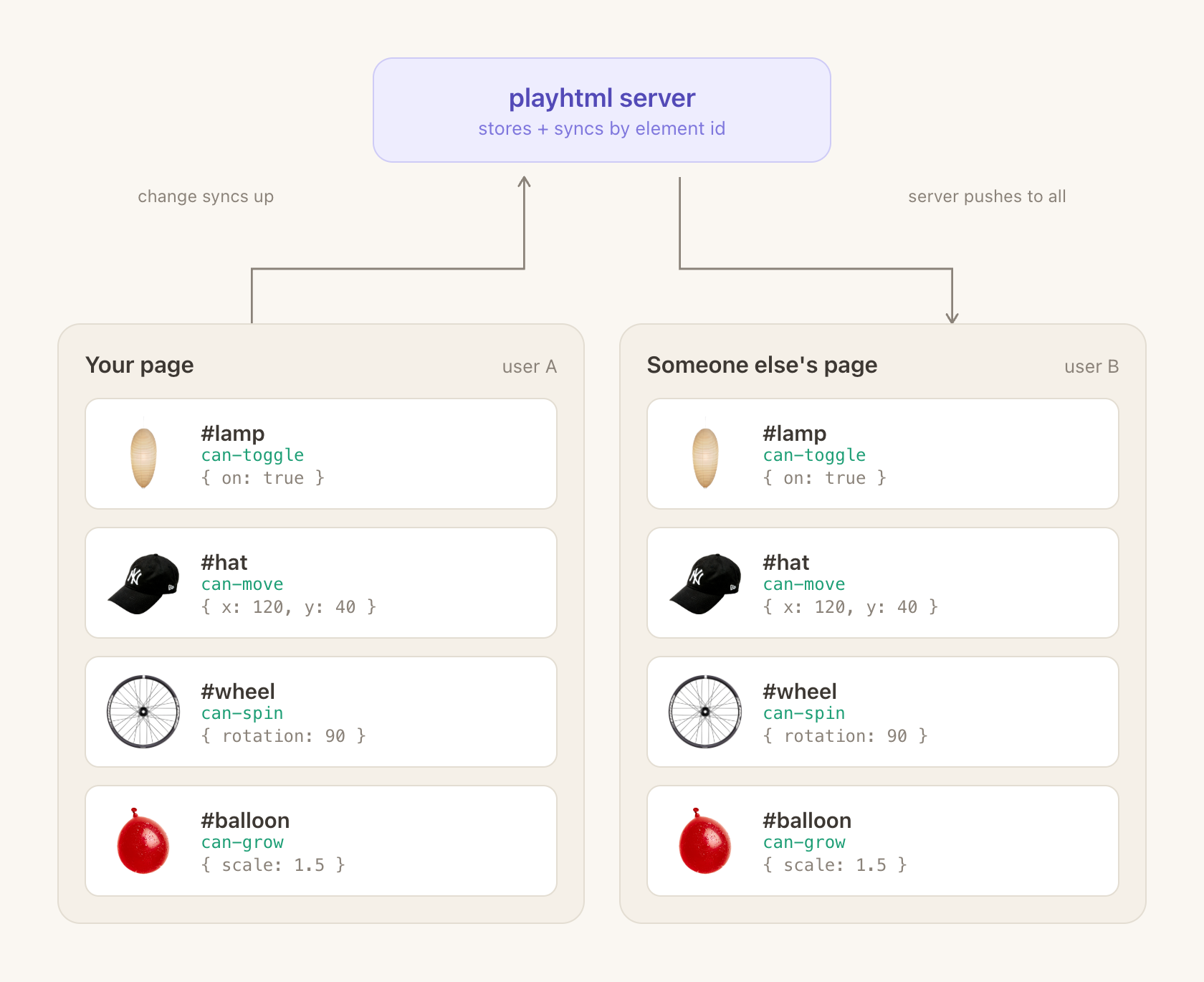
Each element’s data is stored under its id, so the element with the same id on everyone’s page stays in sync:
People: who’s here and what they’re doing
Section titled “People: who’s here and what they’re doing”People is used to reference the actual users on a page and data about them. For example, playhtml.people.everyone is everyone on the page right now, including you. Each person looks like this:
type Person = {
  pid: string;
  name?: string;
  color: string;
  isMe: boolean;
  presence: object;
};nameandcolorare personal properties that save across visits.presencecontains any properties that are transient and only save while someone is on the page. For example, someone’s live status, if they’re typing, etc. Everyone can see it, each person can only set their own, and it disappears when they leave.
Presence lives on the page or on one element, and both use the same names:
- On the page:
playhtml.people.setMyPresence("status", "typing"), read from each person’spresence.status. Cursors are page presence that playhtml fills in for you, atperson.presence.cursor. - On an element: inside an element,
everyone,me, andsetMyPresencedescribe the people using that element and their presence on it. “Who’s hovering this card” is element presence.
For presence shared across several pages, use a presence room. See people and presence and cursors.
Events: one-off moments
Section titled “Events: one-off moments”Events (playhtml.dispatchPlayEvent) are one-off broadcasts that change nothing: confetti, a chime, a notification. Whoever is here when it fires sees it; nobody else ever does. See events.
Inside one element
Section titled “Inside one element”An element can hold three kinds of state, and they differ in who sees them and how long they last:
| Who sees it | How long it lasts | Write it with | Read it as | |
|---|---|---|---|---|
| data | Everyone | Saved, survives reloads | setData | data |
| presence | Everyone | Until you leave | setMyPresence | me.presence, and each person’s presence in everyone |
| localData | Only you, in this tab | Until you reload | setLocalData | localData |
A lamp’s on/off is data. Who’s hovering it is presence. Whether your settings panel is open is local data.
When to use which primitive
Section titled “When to use which primitive”Pick by lifetime first (“should this survive a reload?”), then by scope (“does this belong to one element, the whole page, or one person?”).
| Want | Use | Survives reload | Scope |
|---|---|---|---|
| A toggle, position, count, or any state tied to one element | Element data (defaultData / can-play) | Yes | One element |
| A page-wide counter, prompt, or vote not tied to a DOM node | Page data (playhtml.createPageData) | Yes | One page |
| ”Who is here right now?” / “How many readers?” | People (playhtml.people.everyone) | No | Per person |
| ”Who’s typing?” / a live status for the whole page | Page presence (playhtml.people.setMyPresence) | No | Per person |
| ”Who’s hovering this card?” / state about one element | Element presence (defaultPresence, setMyPresence) | No | Per person, one element |
| ”Where is everyone’s cursor?” | Cursors (person.presence.cursor) | No | Per person |
| Confetti burst, chime, notification | Events (dispatchPlayEvent) | No (fires once) | Broadcast |
| ”How many people reacted to this post?” | Element data (a count field) | Yes | One element |
Writing and shaping data
Section titled “Writing and shaping data”A few habits keep shared data small, fast, and free of conflicts. Each one links to the full explanation and examples.
- Use the mutator form for counts and lists.
setData((draft) => { draft.count += 1 })merges with other people’s edits; passing a whole new value replaces theirs. See mutator vs replacement. - Keep shapes flat, and don’t store values you can compute. Store the raw facts and derive totals or labels when you render. See shaping your data.
- Don’t write on every mouse move or scroll. Write when the action finishes, or use presence or cursors for live motion. See high-frequency events.
- Cap lists that grow forever. Trim old guestbook entries or messages as you add new ones. See bound growing lists.
- Never write shared data from code that re-runs when that data changes, such as a React effect that depends on
dataor insideupdate. Write from clicks and other user actions. See why.
When elements go away for good, you can delete their data; see cleaning up. For how numbers, lists, and keyed collections merge, see merging data changes.
Every element needs a stable id
Section titled “Every element needs a stable id”Element data is stored under the element’s id, so the id must stay the same across reloads and browsers. That’s how two visitors agree on which element is which. A hand-written id="my-lamp" is ideal. If you leave it out, playhtml falls back to hashing the element’s HTML, which can differ across browsers and break sync.
For many elements that share a selector (a row of magnets, a list of reactions), give each the same markup and add a single selector-id attribute instead of inventing unique ids. playhtml indexes the matches by position, so the N-th .magnet always gets the N-th slot of state. See Dynamic elements.